Club Operations
The Five-Minute Front Desk Test for Swim Clubs
Does your front desk slow you down or speed things up? Run this quick test to spot gaps in member check-ins, billing questions, and daily workflow.

It's 10:15 on a Saturday morning. You've got three families waiting at the desk, a phone ringing with a renewal question, a lifeguard asking about the pool chemical delivery, and someone's guest pass isn't pulling up in the system. Your seasonal desk staffer looks at you with that "what do I do first?" expression. Sound familiar? This is the real test of front desk management, and it happens at swim clubs every single weekend during season.
The difference between a smooth Saturday and a chaotic one often comes down to how your front desk operates. Not the technology alone, but the systems, training, and daily habits that make check-ins faster, questions easier to answer, and problems simpler to solve. Let's walk through a practical test you can run this week to see where your front desk stands and what you can improve before your next busy day.
Why Front Desk Management Makes or Breaks Your Day
Think about every interaction that happens at your front desk. Member check-ins. Guest registrations. Billing questions about last month's charge. Lost access cards. Waiver renewals for the new season. Questions about swim lesson schedules. Every single one of these moments shapes how members feel about your club.
When your desk runs smoothly, members get in quickly and staff stays calm. When it doesn't, lines build up, frustration grows, and your desk team spends the whole shift putting out fires instead of helping people.
Here's what good front desk management actually does:
- Gets members through check-in in under 30 seconds
- Gives staff instant answers to common billing and membership questions
- Tracks who's in the facility right now for safety and capacity
- Handles guest passes and waivers without slowing down the line
- Keeps accurate records that your board and managers can actually use
The swimming and aquatic facilities sector has documented how front-desk standard operating procedures, check-in times and staffing patterns directly affect guest satisfaction and facility throughput , showing that small improvements in desk workflow create measurable gains in member experience.

Your front desk isn't just a check-in station. It's your first line of member service, your real-time safety record, and often the place where billing confusion either gets resolved or gets worse.
The Five-Minute Front Desk Test
Want to know if your front desk management is working? Try this simple test during your next shift. You don't need special tools or extra staff. Just observe what actually happens.
Test #1: The Check-In Speed Check
Time how long it takes five different members to check in during a normal flow (not peak rush, not dead quiet). Start when they reach the desk and stop when they're cleared to enter.
What you're looking for:
- Average time under 30 seconds per member
- Staff making eye contact and greeting by name
- System responding immediately when staff look up the member
- No hunting through multiple screens or asking the member to repeat information
If your average is over 45 seconds, you've got a bottleneck. Either your system is slow, your staff needs better training, or your process has extra steps that don't add value.
Test #2: The Billing Question Response
Ask your desk staff these three questions without warning:
- "The Johnsons are asking why their May bill was $15 more than April. Can you tell me right now?"
- "How many members have outstanding balances over $100?"
- "Can you pull up the Martinez family account and tell me their renewal date?"
Passing score: Staff can answer all three in under two minutes total using your system. They know where to look, what the numbers mean, and how to explain it simply.
Failing score: Staff has to call you, check multiple systems, or says "I'd have to look that up." That means they're not trained properly or your system makes basic information too hard to find.
Test #3: The Guest Pass Process
Have someone pretend to be a member bringing a guest. Watch the entire process from start to finish.
Count how many steps it takes:
- Verify the member is in good standing
- Check guest pass allowance and usage
- Collect guest information
- Process waiver (if required)
- Create guest record
- Collect payment (if applicable)
- Issue access credential or check-in confirmation
If this takes more than three minutes or requires staff to leave the desk, print papers, or ask a manager for help, your guest process is too complicated.
Test #4: The Lost Card Recovery
Ask staff: "A member just walked up and says they forgot their access card. What do you do?" Watch them actually do it, don't just listen to the explanation.
Smooth process looks like:
- Staff asks for name or member number
- Pulls up account in under 10 seconds
- Verifies identity with simple question (address, phone, birthdate)
- Checks them in manually or issues temporary access
- Notes it in the system
- Total time: under 90 seconds
Rough process involves hunting through lists, calling managers, writing things on paper, or making members wait while staff figures it out.
Test #5: The End-of-Day Report
At closing time, ask your desk staff to tell you:
- How many members checked in today
- How many guests were registered
- Any incidents, complaints, or unusual situations
- Outstanding tasks for tomorrow's shift
If they can give you accurate numbers and a clear handoff in under five minutes, your tracking and record-keeping works. If they shrug, guess, or say "I'm not sure," you don't have good systems in place.
What Your Test Results Actually Mean
Let's be honest about what you probably found. Most swim clubs fail at least two or three of these tests, especially if you're running on older software or doing things manually. That's normal, but it's also fixable.
| Test Area | Common Problem | What It Costs You |
|---|---|---|
| Check-in speed | Too many clicks, slow system, or manual lookups | Long lines, frustrated members, stressed staff |
| Billing questions | Information scattered across systems | Extra calls to management, billing disputes, member confusion |
| Guest process | Paper waivers, manual tracking, unclear policies | Compliance gaps, slow lines, lost revenue from guests |
| Lost card handling | No quick verification method | Security risks, annoyed members, wasted staff time |
| Daily reporting | No automatic tracking or summary tools | Can't spot trends, no data for board, repeating problems |
The clubs that score well on all five tests usually have one thing in common: they've connected their front desk management to the rest of their operations. Check-ins link to billing. Guest passes connect to member accounts. Everything feeds into reports that managers and boards can actually use.
Building a Front Desk That Actually Works
You don't need to fix everything at once. Start with the biggest pain point from your test results and work from there. Here's what actually makes a difference based on years of swim club operations.
Make Check-Ins Faster Than Walking Through the Door
Your goal is simple: members should spend less time checking in than it takes them to walk from the parking lot to the pool. Thirty seconds or less, every time.
What gets you there:
- One-tap check-in when staff sees a familiar face
- Member search that works with partial names, phone numbers, or membership numbers
- Auto-fill for family members so staff can check in a whole group at once
- Clear visual confirmation (green checkmark, welcome message with name) so staff knows it worked
Stop making staff navigate through menus, confirm multiple screens, or enter the same information twice. Every extra click adds five seconds, and five seconds times 200 check-ins per day equals 15 minutes of wasted time.
Modern swim club management software is specifically designed to handle these high-frequency, low-complexity transactions without slowing down your desk staff.
Give Staff the Information They Need Right Now
Your desk team shouldn't have to call managers or dig through files to answer basic questions. The information should be right there when they need it.
Essential information at the front desk:
- Current account balance and last payment date
- Membership type, status, and renewal date
- Guest pass allowance and year-to-date usage
- Any notes, holds, or special situations flagged on the account
- Emergency contact information
- Waiver status and expiration dates
Put this on one screen. Not scattered across tabs, not buried in menus, and definitely not in a separate system that requires a different login.
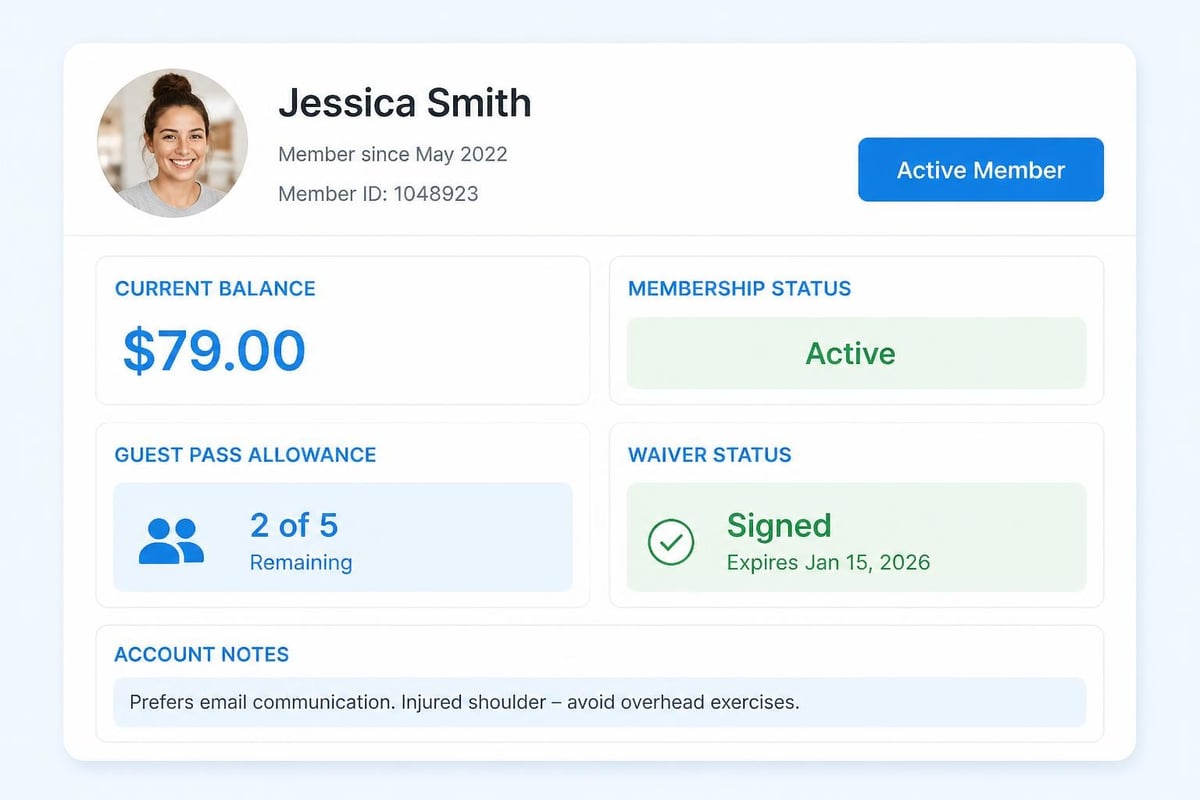
When staff can see everything about a member in three seconds, they can solve problems in 30 seconds instead of three minutes. That difference compounds over hundreds of interactions every week.
Simplify Your Guest Process (Seriously)
Guest registration shouldn't require a law degree or 10 minutes of paperwork. The ADA guidance for sales and service counters emphasizes that front-desk processes must be accessible and straightforward, which benefits all your members and guests, not just those with disabilities.
A good guest process:
- Staff enters guest name and basic contact info
- System auto-links to the sponsoring member
- Digital waiver sent to guest's phone or email (or iPad at desk)
- Payment processed if applicable
- Guest checked in and ready to swim
Total elapsed time: under two minutes. Total paperwork: zero. Total compliance with your insurance and safety requirements: 100%.
If you're still printing paper waivers, filing them in folders, and manually tracking guest counts, you're wasting hours every week and creating compliance gaps. Digital waivers are signed, stored, searchable, and actually accessible when you need them during an incident or insurance review.
The FTC's data security resources for businesses provide practical guidance on protecting the personal information you collect during guest registration, which becomes especially important as you digitize these processes.
Train for the Situations, Not Just the System
Your desk staff needs to know what to do when things go wrong, not just when everything works perfectly. Build your training around real scenarios they'll face.
Training scenarios that actually matter:
- Member's card declined but they insist they paid
- Guest shows up but member isn't here yet
- Parent wants to check in kids but isn't the primary account holder
- System is slow or temporarily offline
- Member asking about a charge from two months ago
- Someone's waiver expired and they didn't realize
Walk through each scenario step by step. Show staff where to look, what questions to ask, and when to escalate to a manager. The SHRM competency checklist for customer service roles outlines the key skills your front desk team needs, from problem-solving to communication under pressure.
Role-play the tough conversations. Practice staying calm when members are frustrated. Teach staff how to say "I don't know, but I'll find out" instead of guessing or making things up.
Protect Member Data Like It Matters (Because It Does)
Your front desk handles sensitive information all day: names, addresses, phone numbers, payment details, family relationships, and sometimes health information on waiver forms. You're responsible for protecting all of it.
Basic front desk security:
- Staff log out when stepping away from the desk
- Computer screens aren't visible to members standing in line
- Payment card information is never written down or saved outside your payment system
- Verbal conversations about accounts happen away from other members
- Access to member data is role-based (desk staff sees what they need, not everything)
If you're processing payments at the front desk, you need to follow PCI security standards for card handling , which means using tokenization, avoiding card storage, and training staff on proper payment procedures.
This isn't optional compliance theater. It's protecting your members' trust and your club's liability. Data privacy and security measures should be built into your front desk management system, not added on as an afterthought.
The Physical Front Desk Setup Matters Too
You can have great software and well-trained staff, but if your physical desk setup fights against efficiency, you'll still struggle. Let's talk about the space itself.
Design for Flow, Not Just Looks
Watch how members and staff move around your front desk during a busy period. Where do bottlenecks form? Where do people bump into each other? Where does the line back up into the entrance?
Layout elements that improve flow:
- Counter height that works for staff sitting and members standing
- Clear space for members to set down bags while checking in
- Separate area for guests filling out waivers (off to the side, not blocking the main line)
- Staff computer screens angled so members can't read them
- Clear sightlines so staff can see the entrance and pool area
The Rick Hansen Foundation's universal design recommendations for reception areas provide detailed guidance on counter heights, knee clearance, and sightlines that make your desk accessible and comfortable for everyone.
Good design doesn't mean expensive renovation. Sometimes it's just moving the printer so staff doesn't have to turn around, or adding a small shelf where members can set their phones while signing in.
Keep Essential Tools Within Arm's Reach
Your desk staff shouldn't have to get up and hunt for basic supplies during check-in rush. Everything they use regularly should be right there.
Front desk essentials:
| Item | Why It Matters |
|---|---|
| Backup internet device (phone hotspot, secondary connection) | System stays up even when main connection drops |
| Temporary access cards or passes | Quick solution for lost cards without slowing the line |
| Incident report forms (digital or paper) | Document accidents, complaints, or unusual situations immediately |
| Member directory or quick-reference guide | Answer common questions without calling managers |
| Basic first-aid supplies | Handle minor situations at the desk without leaving it unstaffed |
During your next shift, watch how many times staff leaves the desk to find something. Each trip wastes time and leaves the desk unattended. Fix that.
Measuring What Actually Matters
You can't improve what you don't measure. But don't measure everything, measure the things that tell you if your front desk management is working.
The Numbers Worth Tracking
Daily metrics:
- Total check-ins (members and guests separately)
- Average check-in time during peak hours
- Number of billing questions or account issues
- Guest passes used versus allowance
- Incident or complaint reports
Weekly metrics:
- Peak traffic times and staffing coverage
- Most common questions or problems
- Member feedback related to check-in experience
- Staff questions or escalations to management
Monthly metrics:
- Check-in trends (growing, stable, declining)
- Guest usage patterns
- Revenue collected at the desk (guest fees, late payments, etc.)
- Training needs identified from recurring issues
You don't need fancy analytics. A simple spreadsheet or even a notebook works if staff actually records the information. The key is consistency and using what you learn to make decisions.
Common Front Desk Management Mistakes
Let's talk about what doesn't work, because avoiding mistakes is often easier than building new systems.
Mistake #1: Treating the Front Desk as an Entry-Level Job That Doesn't Matter
Your front desk is the first and last interaction members have every visit. The person at that desk shapes how members feel about your club. This isn't a throwaway job for whoever is willing to work for minimum wage.
Pay desk staff fairly. Train them properly. Give them authority to solve common problems without running to a manager. When you invest in your front desk team, they invest in your members.
Mistake #2: Adding Steps Instead of Removing Them
Every time something goes wrong, the temptation is to add a new check, a new form, or a new approval step. Pretty soon your simple check-in process has seven steps and takes five minutes.
Instead, ask: "How can we prevent this problem upstream?" or "Can we automate this check?" Adding friction at the front desk punishes every member for one incident.
Mistake #3: Not Connecting Front Desk Data to Everything Else
Check-ins should automatically update attendance records. Guest registrations should link to billing. Waivers should connect to the member account. When these systems don't talk to each other, staff enters the same information multiple times and data gets lost or inconsistent.
Integrated swim club management platforms connect check-ins, billing, scheduling, and reporting so data flows automatically instead of requiring manual transfer or duplicate entry.
Mistake #4: Ignoring Seasonal Staffing Reality
Most swim clubs hire seasonal staff who work June through August and then leave. If your front desk management requires deep system knowledge or six weeks of training, you'll struggle every summer.
Design for quick onboarding. Create simple checklists and quick-reference guides. Build your system so common tasks are obvious and hard to mess up. Save the complex stuff for year-round staff.
Mistake #5: Collecting Data You Never Use
Stop asking for information at check-in if you're not going to use it. Every field staff has to fill out slows down the process. Every question you ask members is friction.
Ask yourself: "What do we actually do with this data?" If the answer is "nothing" or "file it away," stop collecting it. Focus on the information that drives decisions, improves safety, or enhances the member experience.
Technology That Actually Helps
The right front desk management software doesn't replace good training or smart processes, but it makes both easier. Here's what technology should actually do for your front desk.
Speed Up the Stuff You Do a Hundred Times a Day
Check-ins. Guest passes. Account lookups. Balance inquiries. These happen constantly. Your software should make them effortless.
Look for:
- Single-screen check-in with search-as-you-type
- One-click actions for common tasks
- Mobile-friendly interface (so staff can help members anywhere, not just behind the desk)
- Offline mode (so check-ins work even when internet hiccups)
If your current system requires staff to click through five screens to check in one member, you're losing minutes every hour. Those minutes add up to hours every week.
Put the Right Information in Front of Staff Automatically
Staff shouldn't hunt for answers. When they pull up a member account, everything relevant should be right there: balance, status, notes, restrictions, expiration dates.
Smart systems use alerts and notifications to flag issues before they become problems. Account expiring next week? Flag it at check-in so staff can mention renewal. Outstanding balance? Show it so staff can ask about payment. Guest pass limit reached? Block it automatically and explain why.
Make Reporting Automatic, Not Homework
At the end of the day, week, or month, your desk staff and managers should be able to pull reports in seconds, not spend hours compiling data.
Reports that save time:
- Daily attendance summary by member type
- Guest usage by sponsoring member
- Peak traffic times and staffing needs
- Revenue collected at the desk
- Incident log and follow-up items
The AI-powered insights available in modern club management platforms can spot patterns in your check-in data and suggest operational improvements you might miss looking at raw numbers.
Connect to the Tools You Already Use
Your front desk system shouldn't be an island. It needs to work with your billing system, your scheduling software, your communication tools, and your reporting dashboards.
When everything connects, data flows automatically. Members update their email in one place and it's everywhere. Billing changes reflect at the front desk instantly. Attendance feeds into capacity planning and staffing decisions.
Platform stability and reliable integrations matter more than flashy features. A simple system that works every day beats a complex one that crashes on busy Saturdays.

Training Your Team for Success
Technology handles the mechanics, but your team handles the moments that matter. Here's how to train desk staff so they're confident, competent, and calm under pressure.
Start with the Why, Not Just the How
Before showing staff what buttons to click, explain why front desk management matters. Help them understand how their role connects to member safety, club revenue, and everyone's experience.
When staff understand the impact of their work, they care more about doing it right. They ask better questions. They think through problems instead of just following scripts.
Build Training Around Real Shifts
Classroom training helps, but nothing beats learning on the job with support. Schedule new staff to shadow experienced team members during different situations:
- Quiet weekday morning (focus on basics, get comfortable)
- Moderate Saturday afternoon (handle volume, practice speed)
- Busy Sunday during summer (manage pressure, deal with problems)
After each shadow shift, debrief. What went well? What confused them? What questions came up? Use those insights to improve your training for the next person.
Create Quick-Reference Guides They'll Actually Use
Staff needs answers fast, especially when there's a line. Build simple one-page guides for common situations:
- How to handle lost cards
- Guest pass process step-by-step
- What to do when the system is slow
- Common billing questions and where to find answers
- Who to call for different types of problems
Laminate these guides and keep them at the desk. When staff gets stuck, they can glance down and get unstuck in seconds.
Practice the Hard Conversations
Checking in a happy member is easy. Dealing with someone who's upset about a charge, frustrated by a policy, or angry about a situation requires different skills.
Role-play scenarios like:
- "Your system is wrong. I paid that bill."
- "Why can't my friend come in? I have guest passes."
- "I've been a member for 10 years. Can't you just let this slide?"
- "The lifeguard was rude to my kid. What are you going to do about it?"
Teach staff how to stay calm, validate the member's concern, explain policies clearly, and know when to escalate. The goal isn't to win arguments, it's to solve problems and keep members feeling heard.
Making Front Desk Management Easier This Season
You've got a lot of options for improving your front desk. Don't try to fix everything at once. Pick one area from your five-minute test that scored lowest and start there.
Quick wins you can implement this week:
- Create a one-page quick-reference guide for your three most common member questions
- Time your actual check-in process and identify the slowest step
- Ask your desk staff what frustrates them most and fix one thing
- Review your guest pass process and cut one unnecessary step
- Set up a simple end-of-day check-in count tracker
Medium-term improvements for this season:
- Train all desk staff on your five most common billing questions
- Digitize your waiver process if you're still using paper
- Create role-based access so desk staff sees only what they need
- Build a proper handoff procedure between shifts
- Connect check-in data to your attendance and capacity reporting
Longer-term investments for next year:
- Evaluate if your current software actually supports efficient front desk management
- Consider switching to an integrated platform that connects check-ins, billing, and reporting
- Redesign your physical desk layout based on observed traffic patterns
- Develop a comprehensive training program for seasonal staff
- Build automated reporting that shows daily, weekly, and monthly trends
The Real Goal: Spend Less Time Managing, More Time Helping
Good front desk management isn't about control or perfection. It's about creating systems that work so reliably that you barely think about them. When the basics run smoothly, your desk staff can focus on the human parts of their job: welcoming members, answering questions, solving problems, and making people feel good about being at your club.
The clubs with the best front desks aren't necessarily the ones with the fanciest technology or the biggest budgets. They're the ones that thought through the daily workflow, trained their staff well, and built systems that make common tasks simple.
Your front desk should be a strength, not a stress point. It should make your job easier, not harder. And it should give members a smooth, welcoming experience every time they visit.
Run that five-minute test this week. See where you stand. Then pick one thing to improve and get started. Small changes at the front desk create big improvements across your whole operation.
The difference between a front desk that frustrates everyone and one that runs smoothly often comes down to simple systems and the right tools. If you're tired of managing check-ins manually, hunting through spreadsheets for member information, or spending hours on basic reporting, it's worth looking at what modern platforms can do. Clubward brings together check-ins, billing, waivers, and reporting in one place, purpose-built for swim clubs and member facilities that want their front desk to just work. Take a look and see if it fits your club's needs.
From Katelyn Pauley
More from Clubward