Club Operations
The Missing Link: Why Your Tools Don't Talk to Each Other
Your swim club runs on spreadsheets, a billing service, and paper waivers. When these tools don't connect, you waste hours every week.

It's Saturday morning, and your front desk volunteer is asking the same three questions they ask every weekend: "Where's the updated member list?" "Did this family pay?" "Are they allowed to bring guests?" You've got answers somewhere. The member list lives in a Google Sheet. Billing runs through QuickBooks. Guest policies are in an email from March. Your volunteer pulls up three different windows, squints at their phone, and the line behind the counter grows longer. This is what happens when your tools systems don't work together.
Most swim clubs don't have a software problem. They have a connection problem. You're using tools that each do one job reasonably well, but those tools have no idea the others exist. Every gap between systems becomes a place where information gets lost, time gets wasted, and mistakes slip through.
What Tools Systems Actually Mean for Your Club
When we talk about tools systems, we're really talking about how the different pieces of your operation fit together. Not just which software you use, but how they share information, trigger actions, and reduce the number of times you have to enter the same data twice.
Think about your current setup for a moment. You probably have:
- A spreadsheet or database for member records
- Some kind of billing or payment processor
- Email for communicating with families
- Maybe a separate system for event registration
- Paper forms or a clipboard for daily check-ins
- Another spreadsheet for tracking maintenance or incidents
Each tool handles its own job. The problem shows up in the spaces between them.
The Real Cost of Disconnected Systems
You might think the biggest issue is just inconvenience, but disconnected tools systems create actual financial and operational risks. When your membership roster doesn't automatically sync with your billing system, families slip through the cracks. When your check-in process can't verify someone's status in real time, you're guessing about who should be at the pool.

I've seen clubs where the treasurer maintains one version of the member list, the front desk has another, and the swim team coordinator keeps a third. All three versions are slightly different. Nobody's wrong-they're just working with tools that don't talk to each other.
The research on systems thinking and organizational tools shows that when different parts of an organization can't share information smoothly, you don't just lose efficiency. You lose the ability to see patterns, make informed decisions, and respond quickly to problems.
How Tools Systems Break Down (And How You Know)
Here's a quick diagnostic. If you answer "yes" to more than two of these, your tools systems aren't connected well enough:
Daily Operations:
- Do you enter the same member information in more than one place?
- Does someone manually copy data from one system to another at least weekly?
- Do you send information to your board by exporting reports and combining them manually?
- Have you ever discovered a paying member wasn't on the access list?
- Do volunteers ask "which version is current?" about any list or document?
Member Experience:
- Do families have to tell you the same information multiple times?
- Can members update their own contact details, or do they email you changes?
- When someone pays online, does their account status update automatically everywhere?
- Do you sometimes discover balance issues only when a member asks about them?
Revenue and Compliance:
- Could you generate an accurate revenue report right now in under five minutes?
- Do you know exactly which members are current vs. behind vs. on payment plans?
- Can you instantly see who signed this year's waiver and who hasn't?
- Have you ever missed renewals because tracking happens in multiple places?
These aren't software problems. They're integration problems. You need better tools systems that share information automatically.
The Hidden Tax of Manual Bridges
Every time you manually move information between systems, you're building a bridge. That bridge costs you time to cross it, and it creates opportunities for errors every single trip.
Let's do the math on one common scenario:
| Task | Time Per Event | Frequency | Annual Hours |
|---|---|---|---|
| Export member list from spreadsheet | 2 minutes | Weekly | 1.7 hours |
| Import into billing system | 5 minutes | Weekly | 4.3 hours |
| Cross-reference payments to roster | 15 minutes | Weekly | 13 hours |
| Update check-in list manually | 10 minutes | Weekly | 8.7 hours |
| Reconcile discrepancies | 30 minutes | Monthly | 6 hours |
| Total | 33.7 hours |
That's almost a full work week every year spent just moving information around. And that's for one workflow. Most clubs have four or five of these manual bridges.
Building Connected Tools Systems That Save Time
The good news is you don't need to throw everything out and start over. You need to think strategically about which connections matter most and how to automate them.
Start With Your Most Painful Gap
Don't try to fix everything at once. Pick the single most annoying manual process you deal with every week. For most clubs, it's one of these:
- Membership status and access control – Making sure the people at your facility are supposed to be there
- Billing and account status – Knowing who's paid, who owes, and who needs a reminder
- Communication and record-keeping – Sending the right message to the right people and documenting what happened
Choose one. That becomes your first integration priority.
If you're constantly answering "did this person pay?" questions, you need your billing and membership systems connected. If you're always hunting down waivers, you need your document management tied to your member records. If Saturday mornings are chaos because nobody knows who's current, you need your check-in process integrated with your active member list.
Modern digital transformation requires measurement systems that can actually track whether your changes are working. That means your tools systems need to generate accurate data without extra manual work.
The Three Levels of Integration
Not all connections are created equal. Tools systems can integrate at different depths:
Level 1: Manual Export/Import You download a file from System A and upload it to System B. This is what most clubs do now. It works, but it's slow and error-prone.
Level 2: Scheduled Synchronization The systems automatically share updates on a schedule-maybe every night or every hour. Much better, but there's still a delay. Your front desk might be looking at data that's several hours old.
Level 3: Real-Time Integration When something changes in one system, it updates everywhere instantly. A member pays their balance, and their check-in status changes immediately. This is where you want to be for critical workflows.
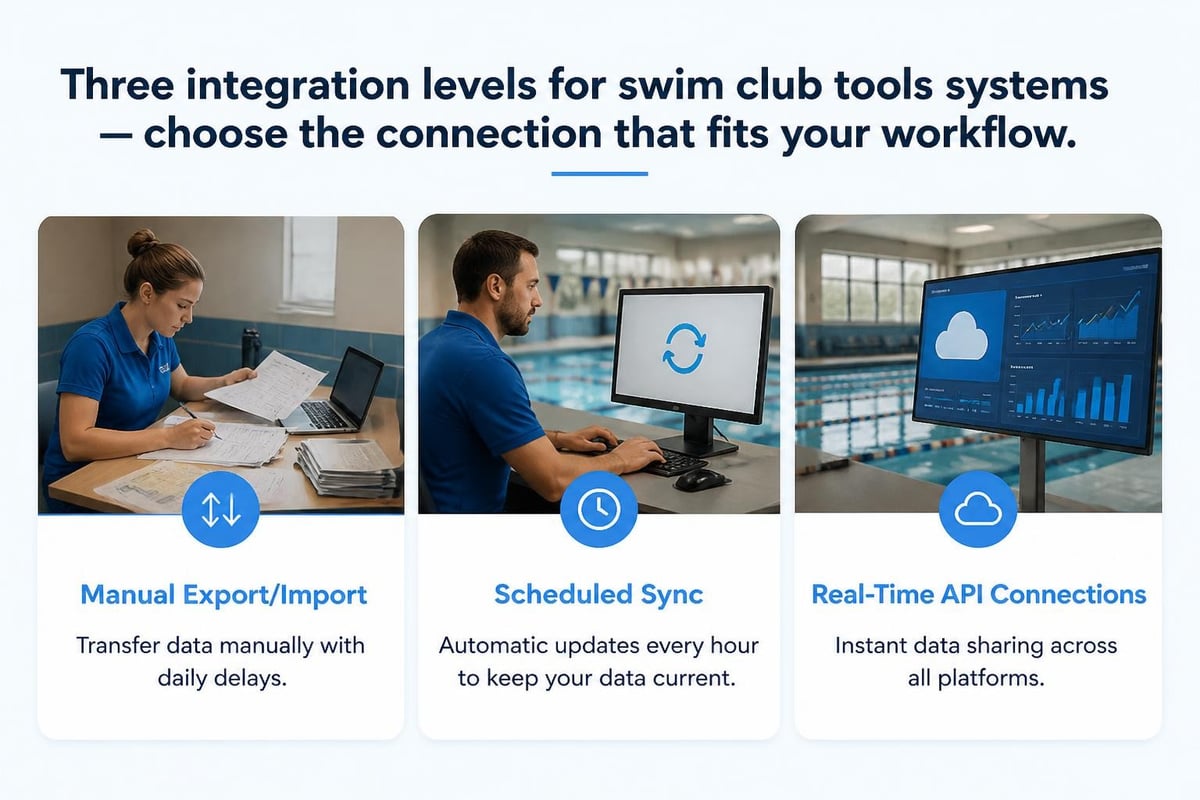
You don't need real-time everything. But for membership status, payment confirmation, and access control, real-time integration prevents problems before they happen.
What to Look for in Integrated Tools Systems
When you're evaluating whether tools can work together-or whether you need to consider a more unified platform for club management -here are the key capabilities that matter:
| Feature | Why It Matters | Questions to Ask |
|---|---|---|
| Single source of truth | One authoritative record for each member | Can two systems show different status for the same person? |
| Automatic updates | Changes propagate without manual work | If a member updates their email, where does it change automatically? |
| Two-way sync | Information flows both directions | Can members self-service, or must staff enter everything? |
| Audit trail | You can see who changed what and when | Can you trace why a status changed? |
| Role-based access | Different people see different capabilities | Can you limit who can modify billing vs. who can just view it? |
The best tools systems don't just connect data. They connect workflows so that one action can trigger appropriate responses across your entire operation.
Common Tools Systems Mistakes (And How to Avoid Them)
After working with dozens of swim clubs, I've seen the same mistakes repeated over and over. Here's what trips people up:
Mistake 1: Assuming "We've Always Done It This Way" Is Good Enough
Your manual processes worked when you had 50 families. At 150 families, they're breaking down. At 300, they're causing real problems.
The frameworks for systems thinking emphasize that as organizations grow, their tools and methodologies need to evolve. What worked at one scale creates bottlenecks at another.
Better approach: Every season, ask yourself what takes more time now than it used to. That's your signal that your tools systems need to level up.
Mistake 2: Choosing Tools in Isolation
You find a great online payment processor. Separately, you find a nice waiver management system. Then you discover they don't share information with each other or with your member database.
Better approach: Before adding any new tool, ask: "How will this connect to what we already use?" If the answer is "manual export and import," think twice.
Mistake 3: Underestimating Training and Change Management
You implement new tools systems, but your volunteers still use the old spreadsheet because "it's easier." Your treasurer hasn't learned the new reports. Your board keeps asking for data formatted the old way.
Better approach: Tools systems only work if people actually use them. Plan for training, create simple guides, and phase changes in gradually. When you're considering a migration to more integrated software , the technical part is often easier than the people part.
Mistake 4: Building Instead of Buying
Some clubs try to create custom solutions by linking free tools together with automation services like Zapier or Make. This can work for simple connections, but it gets complicated fast.
Better approach: Calculate what your time is worth. If you're spending five hours a month maintaining custom integrations, that's probably more expensive than paying for software that already does what you need.
Tools Systems for Different Club Scenarios
Your ideal setup depends on your club's size, complexity, and how you operate. Here's what works at different scales:
Small Clubs (Under 100 Families)
You can get away with simpler tools systems as long as they share some basic information:
- Member directory that exports to your check-in process
- Payment system that flags accounts with balances
- Email tool that pulls from your member list
- Shared calendar everyone can access
The key is minimizing the number of places you update information. If you change a phone number, it should only happen once.
Medium Clubs (100-300 Families)
This is where disconnected tools systems really start to hurt. You need:
- Automated billing that updates member status
- Self-service member portal for basic updates
- Integrated check-in that verifies status in real-time
- Reporting that pulls from all your data sources automatically
- Document management tied to member records
You can't afford to manually reconcile systems every week anymore. The volume of transactions makes that impractical and error-prone. Modern swim club management software is designed specifically for this scale, where integration becomes critical but you don't have IT staff.
Large Clubs or Multi-Facility Operations (300+ Families)
At this scale, you need enterprise-level tools systems:
- Full API access for custom integrations
- Multiple locations with centralized reporting
- Complex membership types and billing scenarios
- Robust security and access controls
- Professional support and uptime guarantees
The research on DevOps toolchain design (while focused on software development) applies here too: at scale, you need tools that are purpose-built to work together, with clear ownership, monitoring, and governance.
Measuring Whether Your Tools Systems Are Working
You've implemented better integration. How do you know it's actually helping? Here are the metrics that matter:
Time Metrics
- How long does it take to add a new member from initial contact to full access?
- How many minutes per week does staff spend reconciling data between systems?
- How quickly can you answer a board member's question about club status?
Accuracy Metrics
- How often do you discover a member's status is wrong in one system vs. another?
- How many payment disputes arise from confusion about account status?
- How frequently do you need to manually correct automated processes?
Satisfaction Metrics
- Do staff and volunteers feel like they're spending less time on admin work?
- Are members able to self-service more tasks without calling you?
- Does your board have confidence in the numbers you report?
Track these before and after any changes to your tools systems. Real improvement shows up in all three categories.
The Move Toward Unified Platforms
More swim clubs are realizing that the best tools systems are actually integrated platforms rather than collections of separate tools. Instead of connecting five different services, you use one system designed to handle membership, billing, communications, and operations together.
This isn't just about convenience. Unified platforms eliminate the integration tax entirely. When all your data lives in one place, you don't need bridges between systems. You don't pay for multiple subscriptions. You don't train people on five different interfaces.
The design research on systems thinking tools shows that the tools we use shape how we think about problems. When your tools are fragmented, you think in fragments. When your tools are unified, you see your club as a whole system.
If you're evaluating whether to continue patching together separate tools or move to an integrated platform, consider these questions:
Total Cost:
- What are you actually spending on all your current tools combined?
- What's the dollar value of the staff time spent moving data around?
- What does it cost when errors slip through the cracks?
Capability:
- Can your current tools systems give you real-time insights?
- Do they enable members to self-service?
- Can they handle your club's growth for the next three years?
Risk:
- What happens if one of your critical tools goes away or changes pricing dramatically?
- How dependent are you on specific people who know how to work your current setup?
- What's your backup and disaster recovery plan?
You can explore how modern AI-powered swim club software approaches these challenges differently, treating your club as one integrated system rather than a collection of disconnected parts.
Making the Transition to Better Tools Systems
If you've decided your current setup isn't working, here's how to make the change without disrupting operations:
Phase 1: Document What You Actually Do (1-2 Weeks)
Before changing anything, write down your current processes:
- How does a new member join, from first contact to first check-in?
- How do payments get processed and recorded?
- How do you handle renewals?
- What happens when someone forgets their card or needs to bring a guest?
- How do you generate reports for your board?
This documentation serves two purposes. It helps you evaluate new tools systems against your real workflows, and it becomes your training material for the new approach.
Phase 2: Run Parallel Systems (2-4 Weeks)
Don't switch cold turkey. Run your new tools systems alongside your old ones for at least two weeks. Enter data in both. Compare outputs. This lets you verify that everything works correctly before you commit.
During this phase, you'll discover edge cases you didn't think about. The family with the weird payment plan. The honorary member who doesn't pay but has access. The seasonal opening procedures. Better to find these issues while you still have your backup system running.
Phase 3: Cutover and Monitor (Ongoing)
Pick a slow period (not opening weekend) to make the switch. Early in the week is better than Friday. Beginning of the month is better than end of month when billing runs.
For the first few days, check everything obsessively. Verify that payments are recording correctly. Make sure check-ins work. Confirm that automated emails are sending. Watch for confused members or frustrated staff.
The practical guidance on implementing new toolchains emphasizes the importance of monitoring and feedback loops during transitions. Your tools systems are only as good as your team's ability to use them.
Phase 4: Optimize and Expand
Once core operations are stable, start leveraging features you weren't using before. Maybe that's automated late payment reminders. Maybe it's member-facing reports. Maybe it's better revenue analytics.
This is where you realize the value of integrated tools systems. Features you couldn't even consider with disconnected tools become straightforward because your data is unified.
Real-World Example: The Saturday Morning Test
Here's a practical test of whether your tools systems are truly integrated:
It's Saturday at 9 AM. Your pool opens in thirty minutes. A family arrives early and the dad says, "We just paid online last night. I know it usually takes a day or two to process, but we drove an hour to get here. Can we get in?"
Scenario A: Disconnected Tools You don't know. Your payment processor and membership database don't talk to each other in real-time. You tell them to wait while you log into your payment system, find the transaction, manually verify it's legitimate, update their status in your membership spreadsheet, and refresh your check-in system. Fifteen minutes later, they're cleared. They're annoyed. The line behind them is longer.
Scenario B: Integrated Tools Systems You pull up their account. You can see the payment was received at 11:47 PM last night, it cleared, their balance is zero, and their status is active. You check them in. Thirty seconds, problem solved.
That's what integrated tools systems actually do. They let you say "yes" confidently and quickly because information flows automatically.

The difference between disconnected tools and integrated tools systems isn't just convenience. It's the difference between spending your time hunting for information and spending your time actually running your club. When your systems share information automatically, you stop being a data coordinator and start being a club administrator. Clubward was built specifically to solve this problem-providing swim clubs with a unified platform where member management, billing, check-ins, and communications work together seamlessly, so you can focus on creating great experiences for your members instead of wrestling with spreadsheets.
From Katelyn Pauley
More from Clubward