Community Nonprofits & Volunteers
A One-Page Volunteer Role Guide for Community Programs
Build a one-page volunteer role guide that explains purpose, preparation, core steps, decision limits, where to get help, and how to improve the guide after the shift.

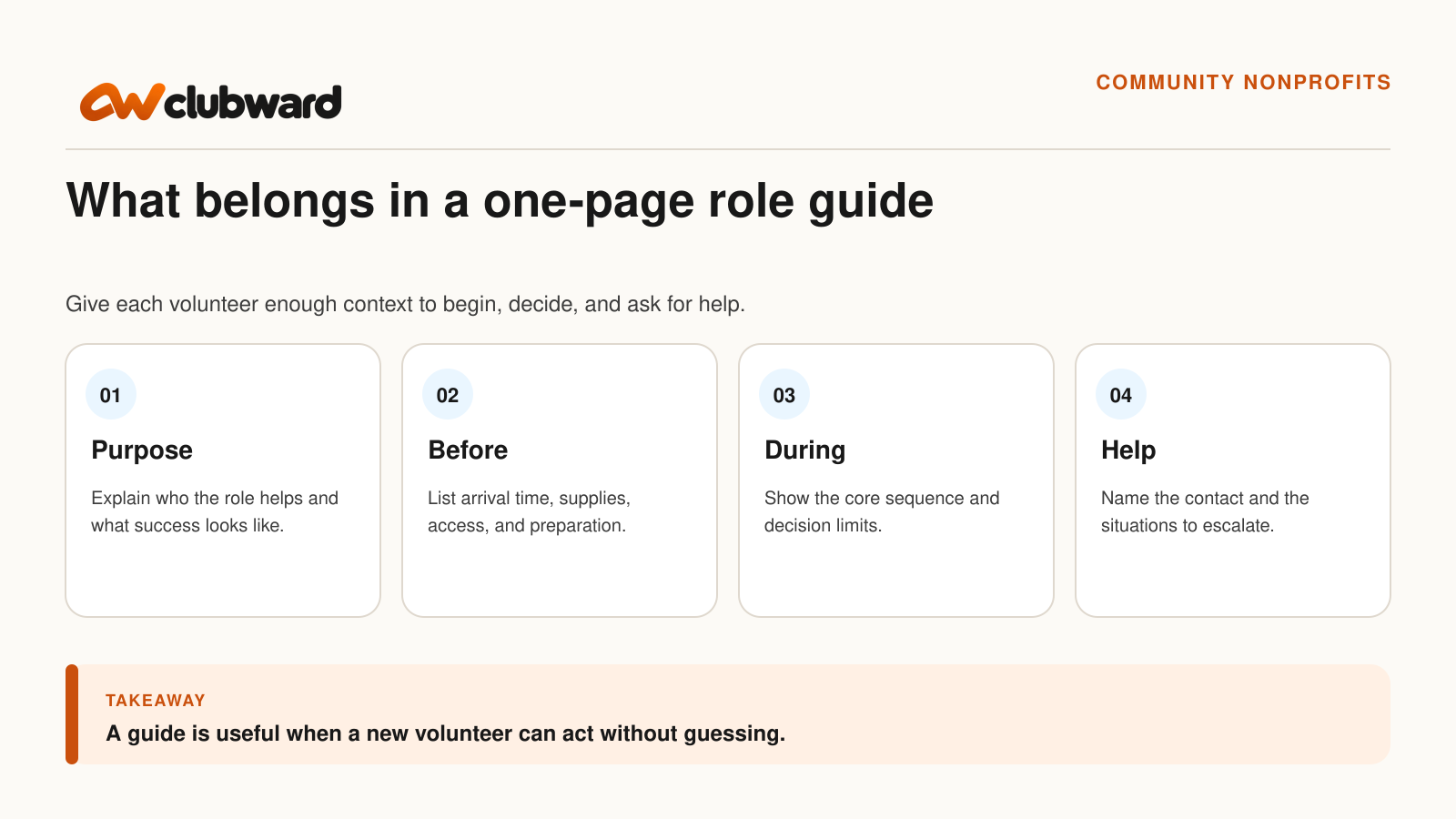
A volunteer role guide should help a person begin useful work without guessing. It should explain why the role exists, what to prepare, which steps matter, where the volunteer’s authority ends, and who can help when the situation does not match the script.
One page forces the team to choose what the volunteer needs at the moment of service. Longer policies, training materials, and program history can still live elsewhere. The role guide is the operating companion that turns those materials into a clear first shift.
This template works for a welcome table, program check-in, room setup, supply distribution, activity support, or another recurring community role. Adapt it to the organization’s actual procedures and participants.
Write the purpose in one sentence
Start with who the role helps and what a good outcome looks like. “Welcome participants, confirm where they are going, and connect questions to the right program contact” is more useful than “Support the front desk.”
A clear purpose helps the volunteer make sense of the steps. It also prevents the guide from accumulating unrelated duties. If a task does not support the role’s purpose, give it another owner or explain when it applies.
Keep the language respectful. Volunteers are part of the operating team, not an audience for vague encouragement. Tell them what they are trusted to do and how their work connects with the participant experience.
Describe the shift before the task
List the program, date, location, arrival time, shift window, and named supervisor or coordinator. Include the entrance, parking or transit note, check-in point, and any approved preparation the volunteer should complete before arrival.
Identify what the organization provides and what the volunteer should bring. If a badge, key, device, shirt, printed roster, supply bin, or training step is required, name the person who confirms it is ready.
Do not hide essential instructions inside an image or a long email thread. The one-page guide should work on a phone and on paper, with links only for detail the volunteer can reasonably open when needed.
Show the core sequence
Use a short ordered list that starts with arrival and ends with closeout. For a welcome role, the sequence might be: arrive and check in with the coordinator, prepare the table, greet each participant, confirm the program or destination, route exceptions, record the required status, and reset the area before leaving.
Use verbs. “Participant experience” is a topic; “Greet the participant and ask which program they are attending” is an action. Keep each step narrow enough for a new volunteer to recognize when it is complete.
Add a reason only where it changes the decision. A brief note such as “Use the current roster so the coordinator sees the same status” can help the volunteer understand why a particular record matters.
Make decision limits explicit
Write what the volunteer can decide and what requires a staff member. They may be able to direct a registered participant to a room, provide a public schedule, or restock approved materials. They may need help with payment questions, record changes, eligibility, a participant complaint, an accommodation request, or a situation involving safety.
A limit should include the next action. “Do not handle account questions” leaves the participant stranded. “Ask the program coordinator to review account questions; stay with the participant until the handoff is clear” tells the volunteer how to help without exceeding the role.
Avoid turning the guide into a list of warnings. Group common situations and give a calm route to help. The tone should support judgment within clear boundaries.
Name the help contact by role and location
“Ask a manager” may not help a volunteer who does not know the staff. Give the person’s role, where they will be, and the backup if they are unavailable. For a short event, include the day-of contact. For a recurring program, identify the current role owner and where updates are posted.
List the situations that should interrupt the coordinator immediately and the questions that can wait for closeout. This protects the participant and helps the coordinator focus on truly urgent issues.
Test the contact path. A phone number in a printed guide is not useful if the coordinator cannot answer during the program. A radio channel, desk location, or nearby staff role may be more reliable.
Keep participant information limited
Give volunteers access only to the information they need for the role. A welcome volunteer may need a name and program status, not a person’s payment history, private notes, or unrelated household records.
Explain where the guide and roster may be used, how paper copies are returned, and what to do if a participant asks to see or change their information. Route corrections through the approved staff process instead of writing them on an exposed sheet.
Use examples without turning them into biographies. “A participant is not on the list” is enough to teach the handoff. The guide does not need a real person’s details.
Prepare the physical workspace
List the table, chairs, signs, badges, pens, device, charger, forms, supplies, and accessibility items required for the role. Assign the setup check to a person and a time.
Walk the participant path. Can someone find the table? Is the sign readable from the entrance? Can the volunteer see the room directions? Is the workspace tall or low enough for the task, and is there a comfortable alternative for a volunteer who needs it?
Keep the layout simple. A volunteer who has to search through several piles while a line forms will rely on memory and improvisation. Organize the materials in the order they are used.
Use a one-page structure
Role purpose: One sentence on who the role helps and what success looks like.
Shift details: Program, location, arrival, finish, coordinator, and backup.
Before the shift: Preparation, training, access, supplies, and workspace setup.
Core sequence: Five to eight ordered actions from arrival through closeout.
Decision limits: What the volunteer can do, what needs staff, and how to make the handoff.
Help and closeout: Immediate contact, routine questions, records to complete, and materials to return.
Practice one routine and one exception
Before the first shift, ask the volunteer to walk through a normal participant arrival. Then add one likely exception, such as a missing registration, a room change, or a question outside the volunteer’s authority.
Watch for hesitation. The volunteer may understand the steps but not the location of the coordinator, or know the rule but not the words for a respectful handoff. Update the guide with the smallest useful clarification.
Do not test the volunteer with obscure surprises. The goal is to verify that the guide and support system work, not to prove that a new person cannot anticipate every situation.
Connect the guide to training and program operations
Give volunteers the role guide before their first shift and use it during orientation. Show them where to find the current program schedule, which spaces they will use, and how to pass questions or unresolved work to staff. Keep longer procedures linked from the guide so volunteers can find the detail they need without losing the core steps.
If you’re exploring Clubward for your nonprofit or community organization, bring one volunteer role to your demo so we can walk through the training, schedules, permissions, and program information your team needs.
Keep a copy of the guide available outside the platform as well. If a system is unavailable, volunteers should know whom to contact, which tasks can continue, and how to record any work that staff will need to enter afterward.
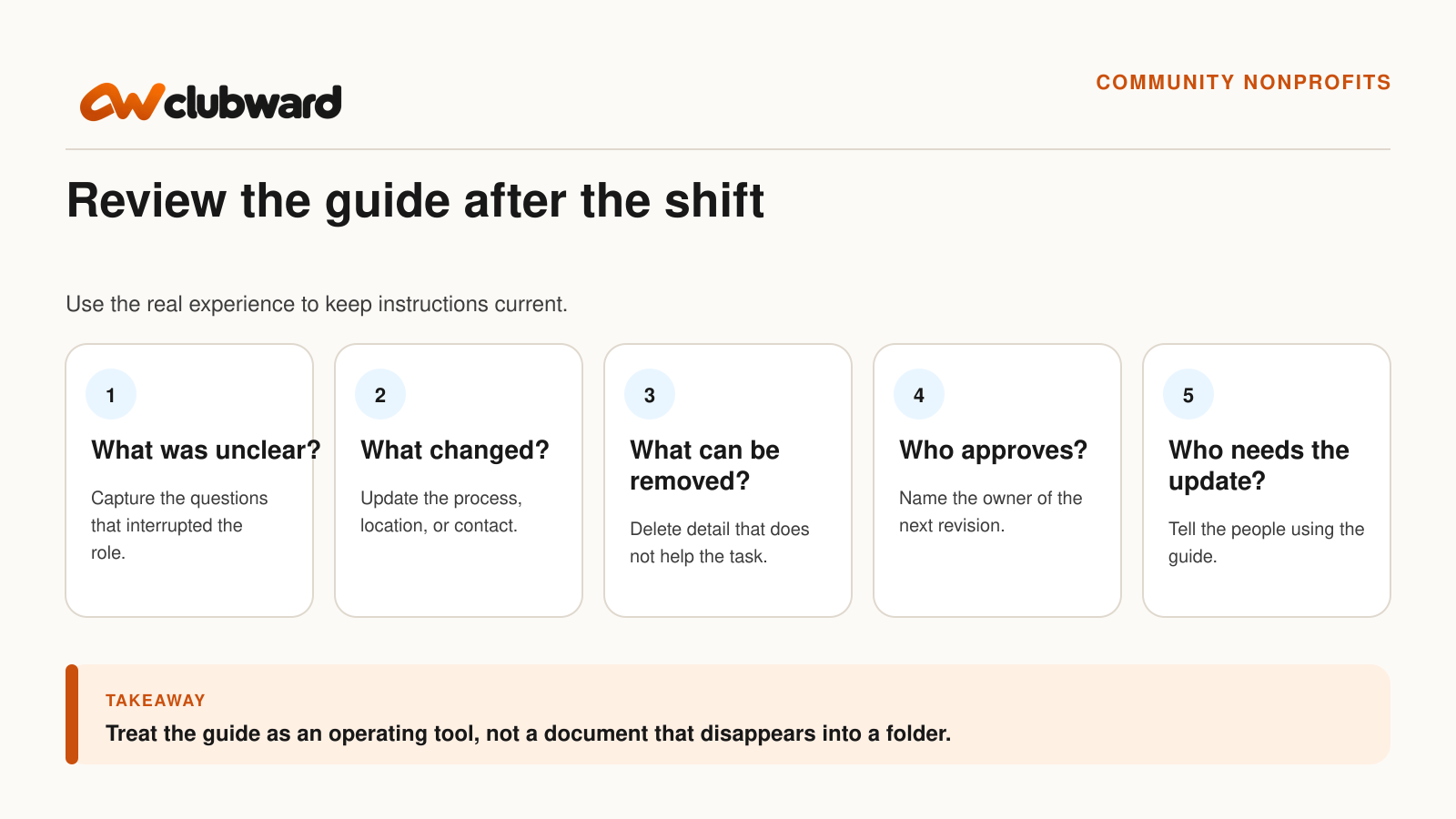
Review the guide after the shift
Ask five questions: What was unclear? What changed? What information was unnecessary? Who approves the revision? Who needs the update? Capture the answers while the experience is fresh.
Do not add every question to the guide. Some belong in training, a program FAQ, or a staff procedure. Keep the one-page document focused on the decisions and steps the volunteer uses during the role.
Record the revision date and owner. Remove old printed copies and update the link used in reminders. A guide with three competing versions can create more uncertainty than having no guide at all.
Recognize the volunteer without hiding process problems
Thank the person for the work and ask about the experience. If the shift was difficult, do not frame every issue as a need for more volunteer effort. The organization may need clearer instructions, better supplies, a different arrival time, or a staff decision.
Use feedback to improve the role, not to score the individual. A new volunteer’s question can reveal an assumption that experienced staff no longer notice.
Close the loop by telling volunteers when their feedback changed the guide. That demonstrates that the operating system values what they observed.
Prepare the next person
Store the current guide with the role, not only with one event organizer. Link it from the shift reminder or training path. Keep program-specific details, such as a room number or day-of contact, easy to update without rewriting the core role.
Assign a backup who can brief a last-minute volunteer. The one-page guide should make that conversation shorter, but it does not eliminate the need for a human welcome and a clear place to ask questions.
Review the role before the next intake or program season. Procedures, contacts, rooms, and tools change. A small scheduled review prevents the guide from becoming a record of how the work used to happen.
Avoid the guide problems that push volunteers back to guessing
Do not begin with the organization’s history or a long policy preface. Link to that context when it is useful, but put the shift, purpose, sequence, limits, and help contact where the volunteer can see them first.
Do not use role labels that mean different things to different people. “Support check-in” could mean greeting, finding names, changing records, taking payments, or solving eligibility questions. Break the role into actions and show which ones belong to staff.
Do not rely on color alone to communicate status. A printed guide, low-contrast screen, or color-vision difference can make the meaning disappear. Pair any visual signal with a word or icon that stands on its own.
Do not put a coordinator’s personal contact details into a reusable public document without approval. Use the organization’s day-of contact method or role-based channel, and update it when responsibility changes.
Do not leave the closeout implied. The volunteer should know where supplies go, what record to complete, whom to tell about an unresolved issue, and when the role officially ends.
Make the guide easy to maintain
Separate stable role instructions from event-specific details. The core sequence and decision limits may remain the same, while the date, room, coordinator, and supply location change. A small editable shift block prevents the team from copying the whole guide for every event.
Give the guide one owner and a visible review date. Other volunteers and staff can suggest improvements, but one person should approve the current version and remove old copies.
Give the guide a recognizable title, such as “Community Welcome Role Guide,” so volunteers can find the right instructions quickly. Use the same title in shift reminders and training materials, and link to the current version.
Check the guide in the form volunteers will actually receive. Open it on a phone, print it in black and white, and ask a new reader to find the arrival time, first action, help contact, and closeout step. If those details require scrolling through unrelated material or interpreting a visual label, simplify the page.
Pair the document with a brief human welcome. The guide can reduce repeated explanation, but it should not make a volunteer feel abandoned with a sheet of instructions. A named person should confirm readiness, invite questions, and explain how the organization will support the role during the shift.
Bring one volunteer role to a Clubward demo
Choose a recurring role with a program, shared space, preparation step, and staff handoff. Book a personalized Clubward demo and ask the team to show how the guide, training, program information, permissions, and follow-up could work together, including anything your organization would still manage elsewhere.
From Katelyn Pauley
More from Clubward