Club Operations
How Your Current Reservations System Costs You Revenue
Your reservations management might be leaking revenue every weekend. Learn the practical fixes that swim club operators use to protect income.

It's Saturday morning at 9:15 AM, and you're already getting the calls. A member wants to book lane 3 for their daughter's birthday party next weekend. Another family is asking if there are still spots for Thursday evening swim lessons. Someone else swears they made a pool reservation for today, but you can't find it anywhere. Your front desk staff is juggling three phone calls, a line at the window, and a notebook full of penciled-in times that may or may not be accurate. Sound familiar?
Evaluate the whole booking workflow
Follow a reservation from availability to payment, cancellation, and reconciliation. Ask the vendor to demonstrate conflicts and exceptions using your club's rules, and base the business case on your own records.
This chaos isn't just stressful. It's costing you real money. Every double-booked lane, every no-show lesson, and every missed reservation represents revenue walking out the door. The difference between a swim club that thrives and one that struggles often comes down to how well you handle reservations management. Let's walk through the problems you're probably facing right now and the practical fixes that actually work.
The Hidden Cost of Manual Reservation Tracking
When you're writing reservations in a spiral notebook or tracking them on a whiteboard, you think you're saving money by avoiding software costs. But let me ask you this: how many times last month did someone show up claiming they had a reservation you couldn't find?
Manual systems create revenue leaks in ways you might not notice:
- No-shows for lesson slots that could have been filled by waitlisted members
- Double bookings that force you to turn away paying guests
- Lost deposits because you forgot to follow up on verbal commitments
- Missed opportunities to upsell amenity rentals or guest passes
A swim club in Texas ran the numbers and found they were losing approximately $847 per month just from lessons that went unfilled because they had no automated waitlist. That's over $10,000 annually from one category alone.
The real problem isn't forgetfulness or poor organization. It's that manual reservations management simply can't scale when you're managing 200+ member families, seasonal guests, lesson programs, lane rentals, and facility bookings all at once.
Why Spreadsheets Stop Working at Scale
You might have upgraded from the notebook to a shared Google Sheet or Excel file. That's definitely better, but it creates new problems. Multiple staff members editing the same spreadsheet leads to version conflicts. Someone overwrites someone else's entry. Cell formatting gets messed up. The file becomes so large it takes forever to load on an older computer.
Common spreadsheet problems swim clubs face:
- No automatic conflict detection when two reservations overlap
- Can't easily see capacity across multiple time slots
- No way to send confirmation emails or reminders automatically
- Difficult to generate reports on utilization or revenue
- Staff training becomes complicated as the spreadsheet grows more complex
One pool manager told me she spent 4-6 hours every Sunday evening reconciling the week's reservations in her spreadsheet to prepare invoices. That's essentially an entire workday lost to administrative cleanup.
What Good Reservations Management Actually Looks Like
Let's flip the script. Imagine it's Saturday morning again, but this time your reservations management system is working for you instead of against you.
A member opens your member portal at 10 PM on Thursday and books a lane for their daughter's party. The system automatically checks capacity, confirms availability, collects the deposit, sends a confirmation email, and blocks off that time. When you arrive Saturday morning, everything is already organized.
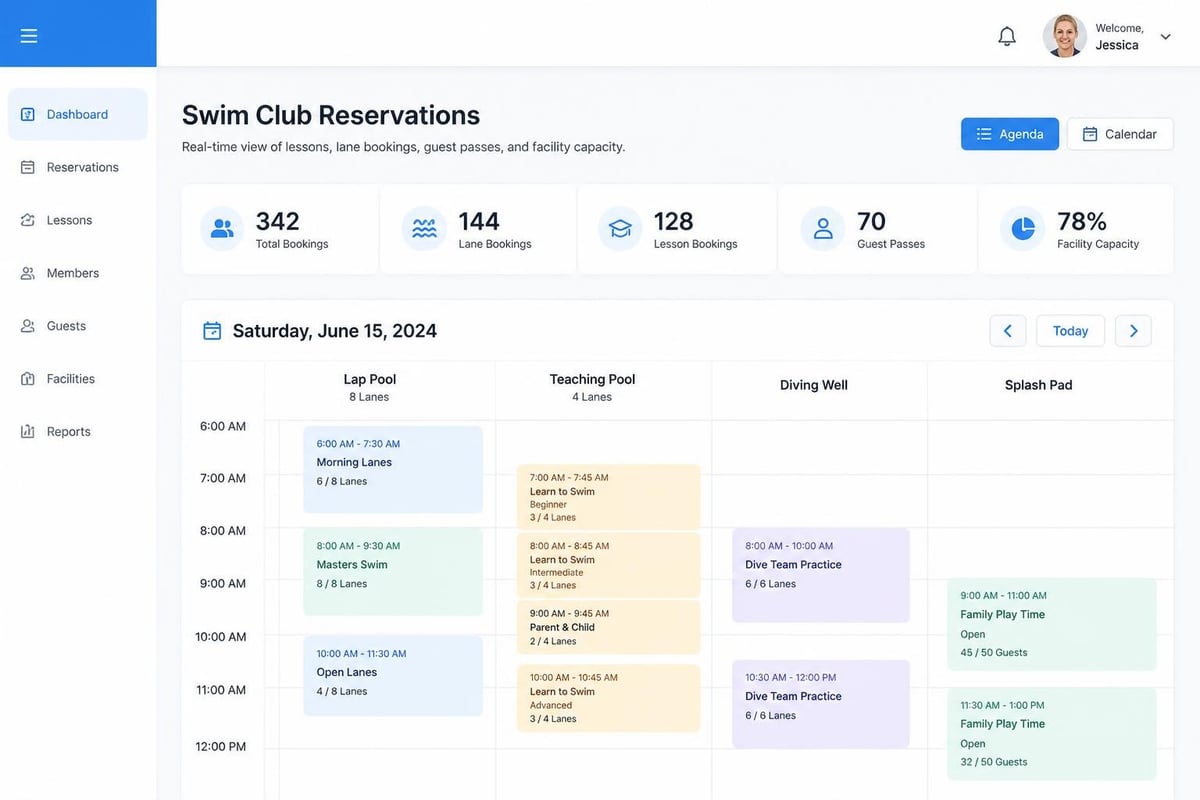
Your front desk staff sees every reservation on one clean dashboard. They know exactly which lanes are available, which lessons still have openings, and which members have outstanding balances. When someone calls to make a reservation, your staff can confirm it in under 60 seconds.
The core features that make reservations management work:
- Real-time availability calendar that updates instantly across all access points
- Automated confirmation and reminder messages sent via email or text
- Waitlist management that automatically fills cancellations
- Conflict detection that prevents double bookings before they happen
- Integrated payment collection that captures deposits immediately
- Member self-service portal that reduces phone calls and front desk work
Use this as a requirements checklist when comparing Clubward's documented club-management features with other options. Ask each provider to demonstrate the entire sequence with your rules; a feature label alone does not establish how exceptions, payment failures, or waitlist offers behave.
The Three Types of Reservations Your Club Needs to Handle
Not all reservations are the same, and your system needs to accommodate different patterns without creating confusion.
Recurring Program Bookings
Swim lessons, water aerobics classes, and lap swim sessions happen on predictable schedules. You need reservations management that can handle recurring bookings without forcing you to manually create each individual slot.
When a member signs up for Tuesday/Thursday lessons for the entire summer, your system should create all those reservations in one action. If you need to cancel one week for maintenance, you should be able to modify just that instance without disrupting the whole series.
One-Time Facility Rentals
Birthday parties, team practices, and special events are one-off reservations that often involve more complexity. You might need to block multiple lanes, reserve the party room, add lifeguard coverage, and track equipment rentals all as part of one booking.
Your reservations management system needs to handle these multi-component bookings while still showing accurate availability for your regular members trying to book a simple lane.
| Booking Type | Typical Duration | Advance Notice | Deposit Required | Cancellation Policy |
|---|---|---|---|---|
| Lap swim lane | 1 hour | Same day | No | Flexible |
| Swim lesson slot | 30 minutes | 1 week | Yes (lesson package) | 24-hour notice |
| Birthday party | 2-3 hours | 2 weeks minimum | Yes (50%) | 1-week notice |
| Team practice | 2 hours | Monthly schedule | Yes (monthly) | 48-hour notice |
Guest and Day Passes
Member guests and day pass visitors create short-notice reservations that still need to be tracked for capacity planning and liability purposes. You need a quick way to add these reservations without the full complexity of a facility rental.
Give staff a quick guest-booking flow while keeping the required capacity and eligibility checks. Test it separately from a multi-hour facility rental: the two transactions need different information and different approvals. Ask which fields can be configured and which checks remain mandatory.
Preventing the Double-Booking Disaster
Double bookings are the nightmare scenario. You promised lane 4 to two different groups for the same time slot. Now you have unhappy members, a front desk crisis, and potential refunds to process.
This usually happens when:
- Phone reservations get written down but not immediately entered into the system
- Multiple staff members are taking reservations simultaneously without seeing each other's entries
- Time zone confusion occurs (less common for local pools, but it happens)
- Recurring reservations overlap with special event bookings
The only reliable prevention is a single source of truth that updates in real time. When one staff member books a slot, every other staff member and every member using your online portal should instantly see that slot as unavailable.
Building in Buffer Time
Smart reservations management includes automatic buffer periods between bookings. If you're running back-to-back swim lessons, your instructors need at least 10 minutes between sessions to provide feedback to parents, reset equipment, and prepare for the next group.
Your system should automatically block those buffer periods so they can't be booked. This prevents the scheduling compression that leads to rushed lessons and frustrated instructors.
Using Waitlists to Maximize Revenue
Here's a question: how many times have you had to turn someone away from a full lesson program, only to have two slots open up the next week because of cancellations?
A properly managed waitlist turns those situations into revenue opportunities. When someone cancels, the next person on the waitlist gets an automatic notification. They have a set time window to claim the spot (usually 24-48 hours). If they don't respond, the system moves to the next person.
Waitlist best practices from successful swim clubs:
- Prioritize by date added, not by any other criteria, to keep things fair
- Set clear expiration windows so spots don't sit unclaimed
- Send immediate notifications via both email and text
- Allow easy acceptance through a simple link click, not a phone call requirement
- Track waitlist conversion rates to predict demand for future sessions
One swim club operator shared that implementing automated waitlist management increased their lesson program revenue by 18% in the first season. Those are real dollars that were previously lost to administrative friction.
Handling Cancellations and No-Shows
Let's be honest about member behavior: people cancel. Sometimes with plenty of notice, sometimes five minutes before their reservation, and sometimes not at all.
Your cancellation policy needs to be clear, enforced consistently, and built directly into your reservations management system. When a policy says "24-hour cancellation notice required," your system should automatically check the timestamp and apply the appropriate fee.
The No-Show Problem
No-shows are particularly frustrating because they represent lost revenue twice. You lose the booking you could have filled with someone on the waitlist, and you often lose the revenue from that slot entirely if your policy doesn't include a no-show fee.
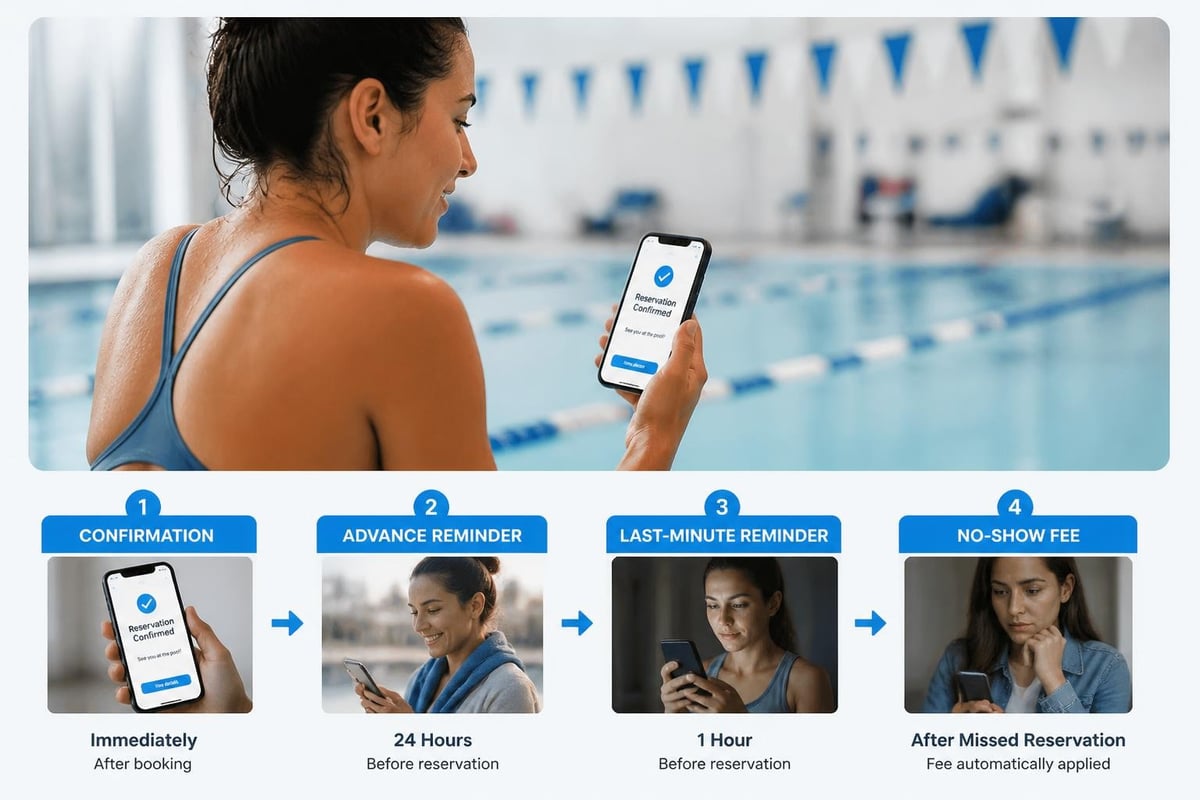
Treat reminder timing as a club-level test, not a guaranteed percentage reduction in no-shows. Compare missed reservations before and after a change using similar sessions, and record both the number of bookings and the number missed. The following is an example reminder sequence to adapt to booking lead time and members' communication preferences:
- One reminder 7 days before the reservation
- One reminder 24 hours before the reservation
- Optional SMS reminder 2 hours before for same-day bookings
These don't need to be elaborate. A simple text that says "Reminder: You have lane 3 reserved tomorrow at 4 PM. Reply C to cancel" is often more effective than a lengthy email.
Member Self-Service: The Game Changer
Your front desk shouldn't be the bottleneck for every reservation. Members should be able to book, modify, and cancel their own reservations through a member portal that's available 24/7.
This doesn't mean you lose control. You set the rules, configure the availability, and establish the policies. The system enforces them consistently while giving members the convenience they expect in 2026.
What members should be able to do themselves:
- View real-time availability across all reservation types
- Book lessons, lanes, and facilities that match their membership tier
- Add guests and pay guest fees at the time of booking
- Modify reservations within your cancellation policy window
- Join waitlists and receive automatic notifications
- View their complete reservation history and upcoming bookings
One of the most common questions I hear is "Won't members abuse the system if we give them that much control?" The answer is: not if your policies are clear and enforced automatically. In fact, member self-service often reduces policy violations because there's no opportunity for "but your staff member told me I could..."
Integration with Your Other Club Operations
Here's where reservations management gets really powerful: when it connects to everything else you're tracking.
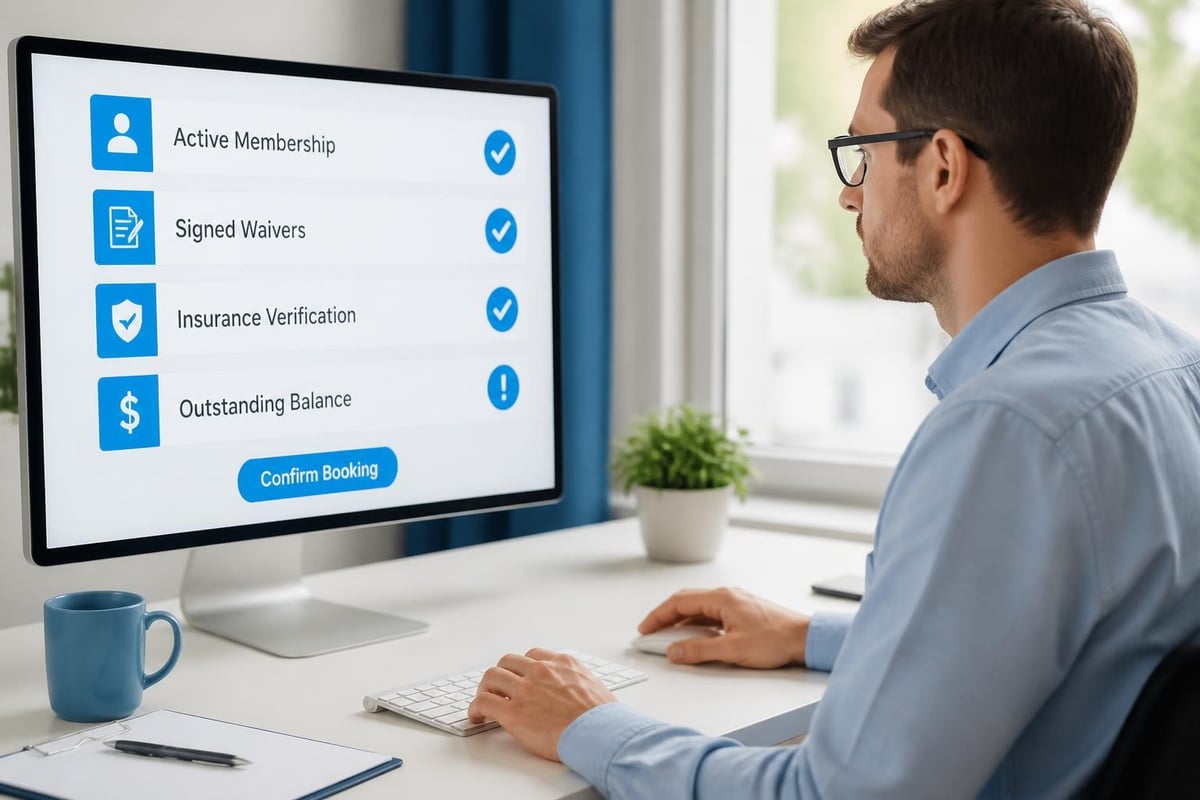
When a member makes a lane reservation, your system should automatically check:
- Is their membership active and in good standing?
- Do they have an outstanding balance that needs to be collected?
- Have they signed the current year's waiver?
- Are they within their membership tier's monthly reservation limits?
If any of those checks fail, the system should either block the reservation or flag it for staff review before it's confirmed.
Connecting Reservations to Billing
Every reservation represents a potential invoice line item. Lane rentals, lesson fees, guest passes, equipment rentals, and party packages all need to flow into your billing system without manual data entry.
In a demonstration, follow one reservation into the household ledger. Check how a deposit, a cancellation, and a refund are represented, and whether staff must take an extra step. Clubward's feature overview documents reservations and billing; confirm the exact fee and approval behavior for your configuration rather than assuming every charge posts automatically.
This integration eliminates the most common source of billing disputes: members claiming they never made a reservation or never cancelled. Your system has timestamps, confirmation emails, and a complete audit trail.
Capacity Planning and Utilization Reports
Your reservations management system is sitting on data gold. Every booking, cancellation, and no-show tells you something about demand patterns, member preferences, and revenue opportunities.
Questions your reservation data should answer:
- Which time slots fill first and could support a price premium?
- Which programs consistently have waitlists and might justify expansion?
- Which days or times rarely get booked and could be repurposed?
- How far in advance do different member segments typically book?
- What's your actual utilization rate versus theoretical capacity?
A tennis and swim club near Austin discovered through their reservation reports that their 7 AM lap swim slots were consistently under-booked, while their 6 PM slots had waitlists. They shifted one lane from morning to evening and increased revenue by $3,200 in the first quarter.
That insight was only visible because they were tracking every reservation in a system that could generate utilization reports. You can't optimize what you can't measure.
The Technical Side: What to Look For
I know you're not a software engineer, but you should understand a few technical concepts when evaluating reservations management systems for your club.
Cloud-Based vs. Local Systems
For a cloud-based option, ask who operates the service, how updates are delivered, which devices are supported, and what happens without internet access. Request the backup schedule, recovery process, and export options in writing. Hosting the system remotely is not a reason to skip a recovery plan.
For a locally hosted option, identify who maintains the equipment, installs updates, monitors failures, and tests recovery. Include those responsibilities and costs in the comparison. Ask the same questions about data ownership and export that you would ask a cloud provider.
Ask each vendor to demonstrate a simultaneous booking attempt: two staff members try to reserve the same lane and time. One should receive a clear conflict message before confirmation. Then test a cancellation, a repeat booking, and a temporary connection failure. These checks give your board concrete evidence about your own reservation workflow.
| Question to verify | Cloud-based option | Locally hosted option |
|---|---|---|
| Remote access | Confirm supported devices and connectivity needs | Confirm the approved remote-access method |
| Backups and recovery | Request provider commitments and test an export | Name the operator and test restoration |
| Updates | Confirm timing, notice, and compatibility | Assign installation and validation responsibility |
| Service interruption | Review support and the club's fallback process | Review hardware support and the club's fallback process |
| Total cost | Include subscription, setup, support, and transaction costs | Include licenses, hardware, support, and staff maintenance |
API Integrations
An API (Application Programming Interface) lets your reservations management system talk to other software. This matters when you want your website to show real-time availability or when you want to sync reservations with your accounting software.
Clubward's website integration overview is a starting point for discussing the path from your public website into member workflows. Ask the provider to demonstrate exactly where authentication occurs and whether a booking uses an embedded form, a link, or another supported integration. Do not assume an API or a login-free booking flow from a website-integration label.
Mobile Responsiveness
Over 60% of your members will try to make reservations from their phones. Your system needs to work perfectly on small screens, not just desktop computers.
This means more than just "the page loads on mobile." It means the booking flow is designed for thumb navigation, buttons are large enough to tap accurately, and forms are simplified to minimize typing on tiny keyboards.
Compliance and Liability Tracking
Reservations aren't just about scheduling. They're also about documentation and liability management.
When a member books your pool, you need to verify they've signed current waivers. When they bring guests, you need guest registration and acknowledgment of rules. When you rent to outside groups, you need proof of insurance on file.
Your reservations management system should enforce these requirements automatically. Trying to book a lane? The system checks for a current waiver and won't complete the reservation until it's signed. Trying to add a guest? The system presents the guest waiver for electronic signature before confirming.
Review recordkeeping with the people responsible for your club's policies. Decide which approvals, waiver versions, cancellation timestamps, and staff overrides need to be retained, who may access them, and when they should be removed. Test whether the proposed system can produce those records without treating a healthcare booking standard as a rule for your club.
Seasonal Challenges and How to Handle Them
Swim clubs operate on dramatic seasonal curves. You might have 80% of your annual reservations concentrated in 16 weeks of summer. Your reservations management system needs to handle that surge without breaking.
Pre-Season Opening Rush
When you open registration for the new season, you'll get a flood of bookings in the first 48 hours. Your system needs to handle hundreds of simultaneous users without crashing or creating data conflicts.
This is where cloud-based infrastructure matters. Your software provider should be able to scale server capacity automatically during peak usage, then scale back down during quiet periods.
End-of-Season Closeout
As the season winds down, you need clean data for next year's planning. Your reservations management system should make it easy to archive old bookings, analyze the season's performance, and prepare for renewal campaigns.
Some clubs struggle because their reservation data is trapped in formats that can't be analyzed. You should be able to export complete reservation histories to CSV or Excel for deeper analysis in other tools.
Staff Training and Adoption
The best reservations management system in the world won't help if your staff doesn't use it correctly. This is especially challenging for seasonal facilities that hire new front desk workers every year.
Your system should be intuitive enough that new staff can handle basic reservations after 30 minutes of training. Complex scenarios might require more practice, but the everyday tasks should be obvious.
Training priorities for front desk staff:
- How to check availability and confirm a basic reservation
- How to handle payment collection at the time of booking
- How to add guests and verify guest policies
- How to manage cancellations within policy guidelines
- How to access the waitlist and fill cancelled slots
- Who to escalate to for unusual requests or system problems
Create a simple one-page quick reference guide that lives at the front desk. Include screenshots for the five most common tasks. Your staff shouldn't need to dig through a 40-page manual to remember how to cancel a reservation.
Making the Business Case for Better Systems
If you're still using manual reservations management or an outdated system, you might face resistance from your board about the cost of upgrading. Let's talk about how to make the case.
Start with the revenue calculations. How much are you losing to:
- No-shows that could be prevented with automated reminders?
- Unfilled slots that could be filled from waitlists?
- Double bookings that result in refunds and unhappy members?
- Staff time spent on manual scheduling and conflict resolution?
For most swim clubs, the combination of recovered revenue and saved staff hours pays for modern reservations management software in less than one season.
Illustrative calculation: suppose a club saves three administrative hours a week over a sixteen-week season and values that time at $25 an hour. That represents $1,200 of staff capacity. If it also fills twenty otherwise empty lesson spaces with a $30 contribution per space after direct delivery costs, that adds $600. The combined $1,800 is a scenario to compare with total costs, not a predicted Clubward result. Check that a recovered booking is not counted twice.
Beyond dollars, think about member satisfaction. How many members would renew their memberships or recommend your club to friends based on how easy it is to make reservations? You can't put an exact number on that, but it's real value.
When you're ready to explore what modern systems can do, resources like Clubward's feature overview show how integrated platforms handle reservations alongside all your other club operations.
Real-World Implementation: What to Expect
Let's say you've decided to upgrade your reservations management. What does implementation actually look like?
Data Migration
Your first challenge is getting existing reservation data into the new system. If you're moving from spreadsheets or another software platform, you'll need to export that data and import it into your new system.
Quality platforms provide migration support and tools to help with this process. You shouldn't have to manually re-enter hundreds of existing reservations.
Configuration and Setup
Before you can start taking reservations, you need to configure your system:
- Define your facilities and lanes that can be reserved
- Set up your reservation types (lessons, rentals, lap swim, etc.)
- Configure availability calendars and booking windows
- Establish pricing for different reservation categories
- Create your cancellation policies and buffer times
- Set up automated messages and reminders
This typically takes 2-4 weeks for a standard swim club, longer if you have complex facility arrangements or multiple membership tiers with different rules.
Controlled Cutover and Reconciliation
Choose one system to accept live bookings during the transition. Keep an export of the old records for reconciliation and recovery, with access limited to the staff who need it. Compare imported reservations, payments, and cancellations before cutover. Avoid asking staff to maintain two independent live calendars, which creates uncertainty about which booking is authoritative.
This gives your staff time to build confidence, lets you identify any configuration issues, and provides a safety net if something goes wrong.
Member Communication
Your members need to know about the change, especially if they'll be using a new member portal for self-service bookings. Send clear communication at least two weeks before launch:
- What's changing and when it takes effect
- How to access the new booking system
- Instructions for creating an account (if needed)
- Support resources for questions and problems
- What stays the same to reduce anxiety about change
Expect a surge of support questions in the first week. Make sure your front desk has extra coverage and that your software provider's support team is responsive.
Avoiding Common Mistakes
I've seen clubs make the same reservations management mistakes repeatedly. Let's talk about how to avoid them.
Mistake 1: Over-Complicated Booking Rules
You want to accommodate every possible scenario, so you create 17 different reservation categories with different rules, pricing, and availability windows. Your staff gets confused. Your members get frustrated. Nobody knows which option to choose.
The fix: Start simple. Create 3-5 core reservation types that cover 90% of your use cases. Handle unusual requests as custom bookings that require staff approval. You can always add complexity later if you genuinely need it.
Mistake 2: Not Enforcing Your Own Policies
You establish a 24-hour cancellation policy, then your front desk waives it "just this once" for a member who calls 20 minutes before their reservation. Word spreads, and soon nobody takes your policies seriously.
The fix: apply the published rule consistently and define who can approve exceptions, for what reasons, and where the decision is recorded. Review repeated exceptions for signs that the policy needs revision. For court-specific cancellation windows, release times, and appeals, use our tennis club reservation and no-show policy guide.
Mistake 3: Ignoring Mobile Users
You implement a beautiful reservations management dashboard that works perfectly on desktop computers, then discover that 70% of your members try to book from phones and can't figure out the interface.
The fix: Test every booking flow on mobile devices before you launch. Better yet, choose a platform that was designed mobile-first and adapted to desktop, not the other way around.
Mistake 4: No Backup Plan for Technology Failures
Your internet goes down or your reservations management system has an outage. You have no paper backup, no list of today's reservations, and no way to check anyone in.
The fix: Every morning, print or export a PDF of the day's reservations. Keep it at the front desk as an offline reference. It's low-tech, but it works when technology fails.
Looking Ahead: Trends to Watch
Reservations management continues to evolve. Here's what's on the horizon that might affect swim clubs in the next few years.
AI-Powered Demand Prediction
If a vendor proposes demand forecasting, ask which inputs it uses, how it handles missing information, and how staff can check a recommendation against reservation records. Try a realistic scenario such as a recurring lesson waitlist, and distinguish a historical trend from a forecast. A suggestion should not change capacity or pricing without an authorized review.
Clubward describes operational signals across attendance, billing, and staffing on its AI insights overview. Use that page to frame a demonstration, then confirm the exact reservation questions the available product can answer. Do not assume that a general insights feature includes weather forecasting or automatic schedule changes.
Dynamic Pricing
Before considering variable prices, decide whether different rates for peak and quiet slots would fit your membership promise. Compare that option with simpler alternatives, such as different program times or a clearer booking window. Ask members and the board to review the policy before asking a vendor to automate it.
If you choose a pricing experiment, define the eligible reservation types, displayed prices, effective dates, and approval process. Compare paid bookings, complaints, and contribution after delivery costs. Treat any improvement as something to measure; neither a rule change nor a software feature guarantees additional revenue.
Integration with Member Apps
Evaluate a mobile app against the tasks members need to complete. Can they review availability, receive a confirmation, and cancel without contacting the office? Compare that experience with the provider's mobile website. Require a demonstration of any notification feature that matters to your club.
The challenge is that building a custom app is expensive. Watch for platforms that offer white-label mobile apps as part of their reservations management suite.
The Role of Standards and Best Practices
Write down the reservation states your club actually needs: requested, confirmed, waitlisted, cancelled, and completed. For each state, identify who can change it, whether money is due, and what the member should receive. Use those definitions consistently in staff training and vendor demonstrations.
For example, ask what happens when a waitlisted member pays after an offer expires. Does the payment create a valid booking, require a refund, or trigger staff review? Then test a cancellation after a deposit has been collected. These are club-specific acceptance tests, not proof that an unrelated industry's reservation standard applies to your facility.
Keep the results in a simple evaluation sheet: scenario, expected behavior, observed behavior, remaining question, and owner. Have front-desk and finance staff review the same sheet so that a booking that looks correct on the calendar is also correct in the household ledger.
Integration with Financial Planning
Your reservation data should inform your annual budget and revenue projections. How many lesson sessions can you realistically fill based on historical booking patterns? What's your expected utilization rate for lane rentals?
Use the latest complete season as a starting point, then label assumptions about membership growth, prices, staffing, and weather-related closures. Compare a conservative case with your budget case. Historical bookings help you ask better questions; they do not make next season's revenue certain.
This level of revenue tracking and forecasting helps clubs make smarter decisions about staffing, facility improvements, and program expansion.
Start your evaluation with three workflows: a paid booking, a cancellation with a waitlist, and an exception requiring staff approval. Bring the same scenarios to every vendor demonstration and record what actually happens. Clubward lists reservations, billing, member records, and reporting in its current feature overview. Schedule a Clubward walkthrough to evaluate those workflows against your club's policies.
From Katelyn Pauley
More from Clubward